> ## Documentation Index
> Fetch the complete documentation index at: https://docs.qtap.qa/llms.txt
> Use this file to discover all available pages before exploring further.
# Qtap plans compared: Starter, Growth, Elite, Franchise
> What each Qtap plan includes, how the limits differ, and how to pick the one that fits your business.
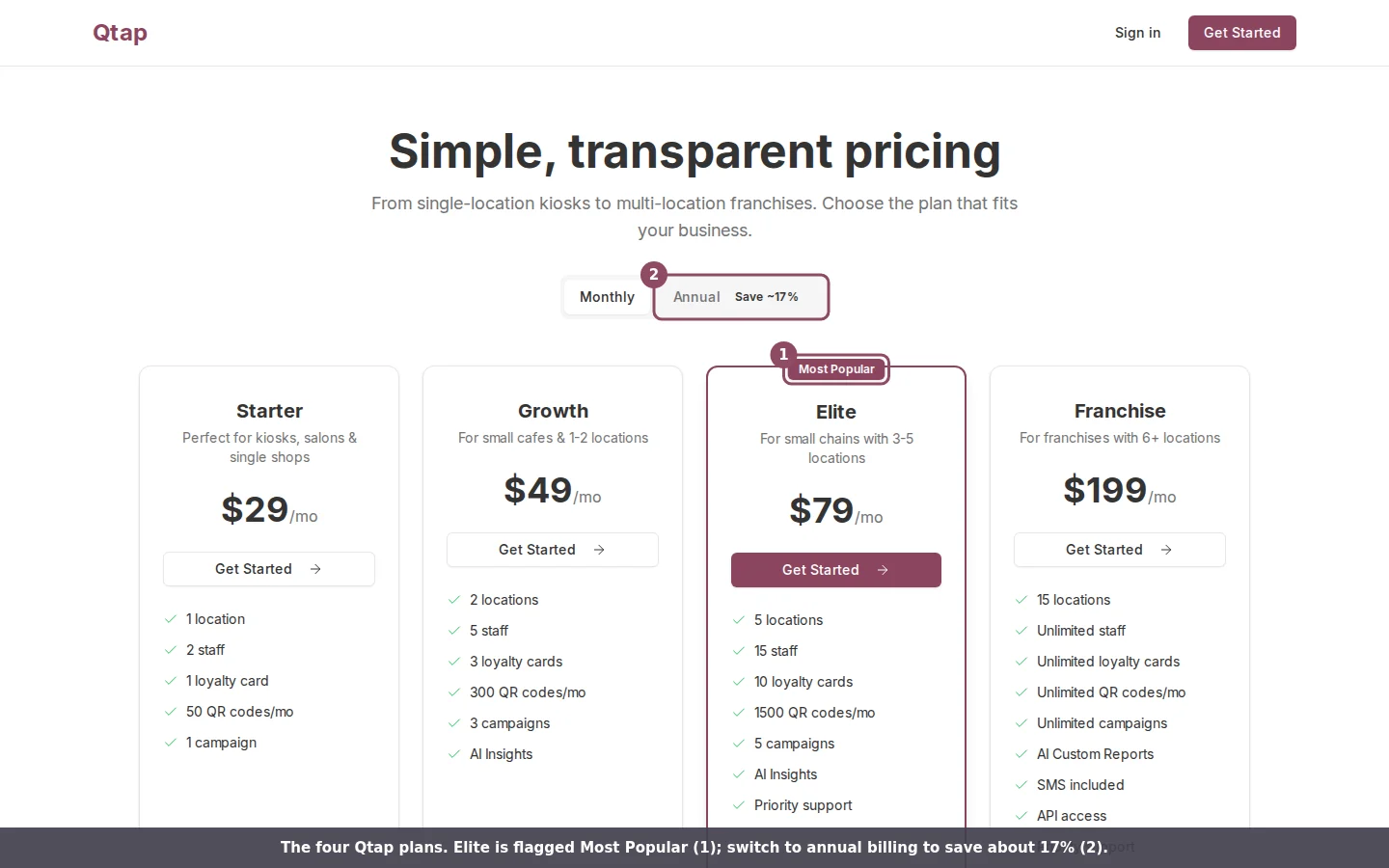
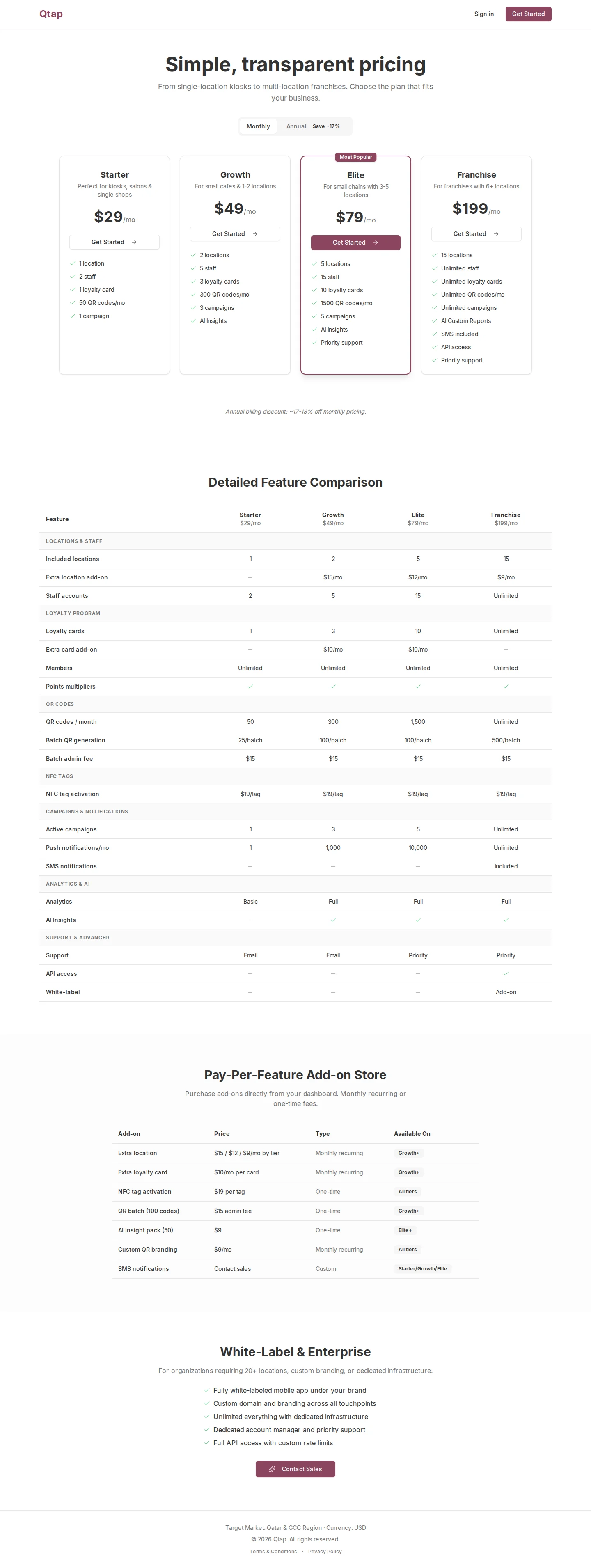
Qtap has four plans. Starter suits a single kiosk or salon, and Franchise covers a chain of locations. The difference between them comes down to how many locations, staff, loyalty cards, QR codes, and campaigns you can run, plus a few features that turn on at higher tiers. You can see all four side by side at **dashboard.qtap.qa/pricing**, and your own plan and usage under **Settings > Billing**.
 ## What each plan includes
| Feature | Starter | Growth | Elite | Franchise |
| ---------------------------- | ------- | ------ | -------- | --------- |
| Price per month | \$29 | \$49 | \$79 | \$199 |
| Annual price (per month) | \$24 | \$39 | \$65 | \$165 |
| Locations | 1 | 2 | 5 | 15 |
| Staff accounts | 2 | 5 | 15 | Unlimited |
| Loyalty cards | 1 | 3 | 10 | Unlimited |
| QR codes per month | 50 | 300 | 1,500 | Unlimited |
| Active campaigns | 1 | 3 | 5 | Unlimited |
| Push notifications per month | 1 | 1,000 | 10,000 | Unlimited |
| Analytics | Basic | Full | Full | Full |
| AI Insights | No | Yes | Yes | Yes |
| Year in Review (Wrapped) | No | Yes | Yes | Yes |
| SMS notifications | No | No | No | Included |
| API access | No | No | No | Yes |
| Support | Email | Email | Priority | Priority |
Points multipliers and unlimited members come with every plan, including Starter. The jump from Starter to Growth is where AI Insights, the full analytics view, and your Year in Review report turn on. SMS and API access stay exclusive to Franchise.
## What each plan includes
| Feature | Starter | Growth | Elite | Franchise |
| ---------------------------- | ------- | ------ | -------- | --------- |
| Price per month | \$29 | \$49 | \$79 | \$199 |
| Annual price (per month) | \$24 | \$39 | \$65 | \$165 |
| Locations | 1 | 2 | 5 | 15 |
| Staff accounts | 2 | 5 | 15 | Unlimited |
| Loyalty cards | 1 | 3 | 10 | Unlimited |
| QR codes per month | 50 | 300 | 1,500 | Unlimited |
| Active campaigns | 1 | 3 | 5 | Unlimited |
| Push notifications per month | 1 | 1,000 | 10,000 | Unlimited |
| Analytics | Basic | Full | Full | Full |
| AI Insights | No | Yes | Yes | Yes |
| Year in Review (Wrapped) | No | Yes | Yes | Yes |
| SMS notifications | No | No | No | Included |
| API access | No | No | No | Yes |
| Support | Email | Email | Priority | Priority |
Points multipliers and unlimited members come with every plan, including Starter. The jump from Starter to Growth is where AI Insights, the full analytics view, and your Year in Review report turn on. SMS and API access stay exclusive to Franchise.
 ## Which plan fits you
* **Starter** works for one shop with one loyalty card and a small team. One push notification a month means you send the occasional announcement, not a weekly campaign.
* **Growth** fits a cafe with one or two branches that wants to run real campaigns and track its numbers. The 1,000 monthly push notifications cover regular member outreach.
* **Elite** suits a small chain of three to five locations. You get more staff seats, ten loyalty cards, and priority support.
* **Franchise** is for six or more locations that need unlimited everything, SMS, and API access to connect Qtap to other systems.
Start on the plan that matches your business today, not the one you might grow into. Upgrading takes effect right away, so you can move up the month you open a second location.
## Monthly or annual
Every plan has a monthly price and a lower annual price, billed as one payment for twelve months. Annual billing saves about 17% against paying month to month. You choose the billing interval when you pick a plan, and you can see both prices using the Monthly / Annual toggle on the pricing page and in the Plans tab.
## See your usage before you decide
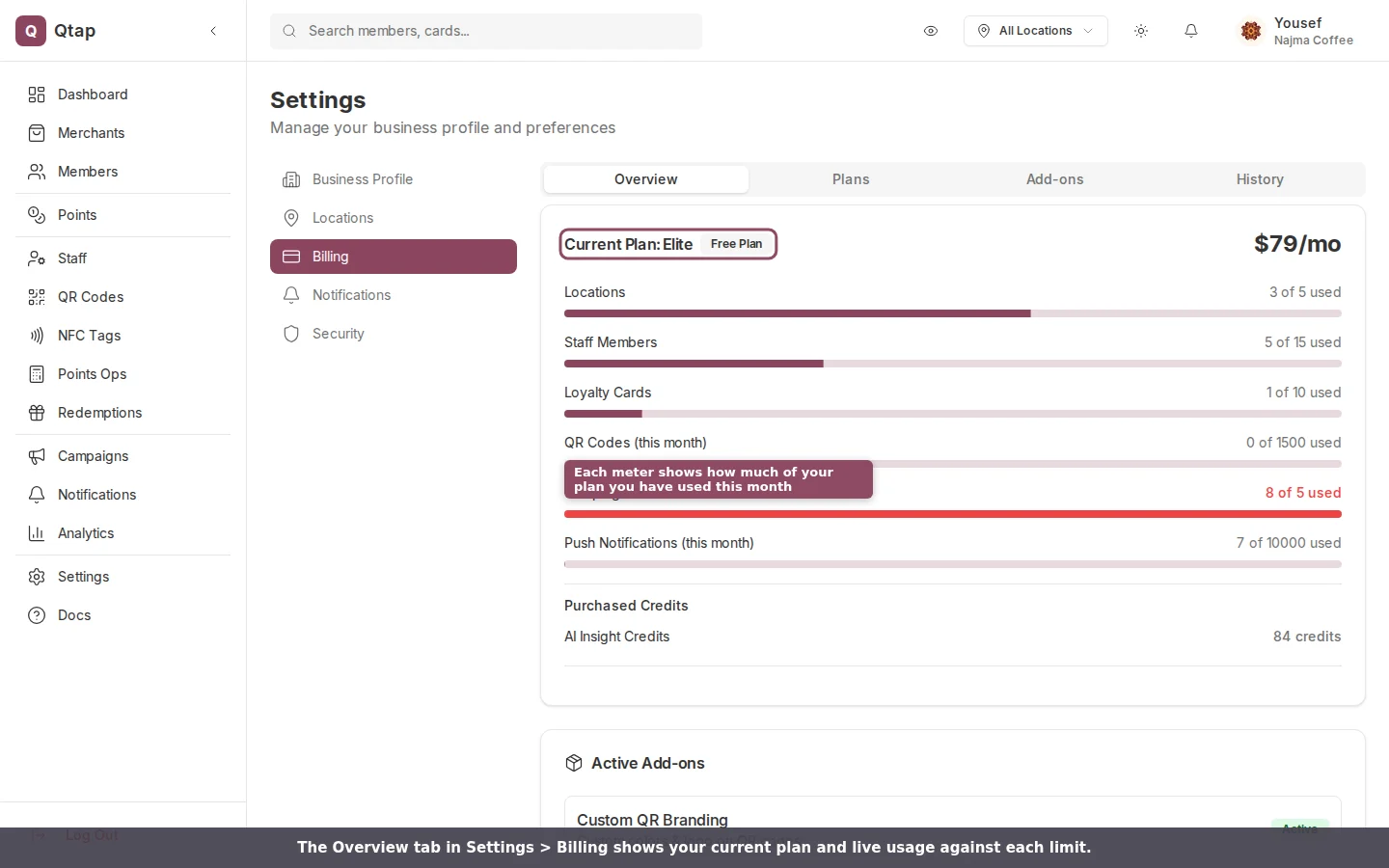
Open **Settings > Billing** to see your current plan and how much of each limit you have used this month. Each meter fills as you add locations, staff, cards, QR codes, and campaigns, so you can tell whether you are close to needing the next tier.
## Which plan fits you
* **Starter** works for one shop with one loyalty card and a small team. One push notification a month means you send the occasional announcement, not a weekly campaign.
* **Growth** fits a cafe with one or two branches that wants to run real campaigns and track its numbers. The 1,000 monthly push notifications cover regular member outreach.
* **Elite** suits a small chain of three to five locations. You get more staff seats, ten loyalty cards, and priority support.
* **Franchise** is for six or more locations that need unlimited everything, SMS, and API access to connect Qtap to other systems.
Start on the plan that matches your business today, not the one you might grow into. Upgrading takes effect right away, so you can move up the month you open a second location.
## Monthly or annual
Every plan has a monthly price and a lower annual price, billed as one payment for twelve months. Annual billing saves about 17% against paying month to month. You choose the billing interval when you pick a plan, and you can see both prices using the Monthly / Annual toggle on the pricing page and in the Plans tab.
## See your usage before you decide
Open **Settings > Billing** to see your current plan and how much of each limit you have used this month. Each meter fills as you add locations, staff, cards, QR codes, and campaigns, so you can tell whether you are close to needing the next tier.
 ## Add-ons instead of upgrading
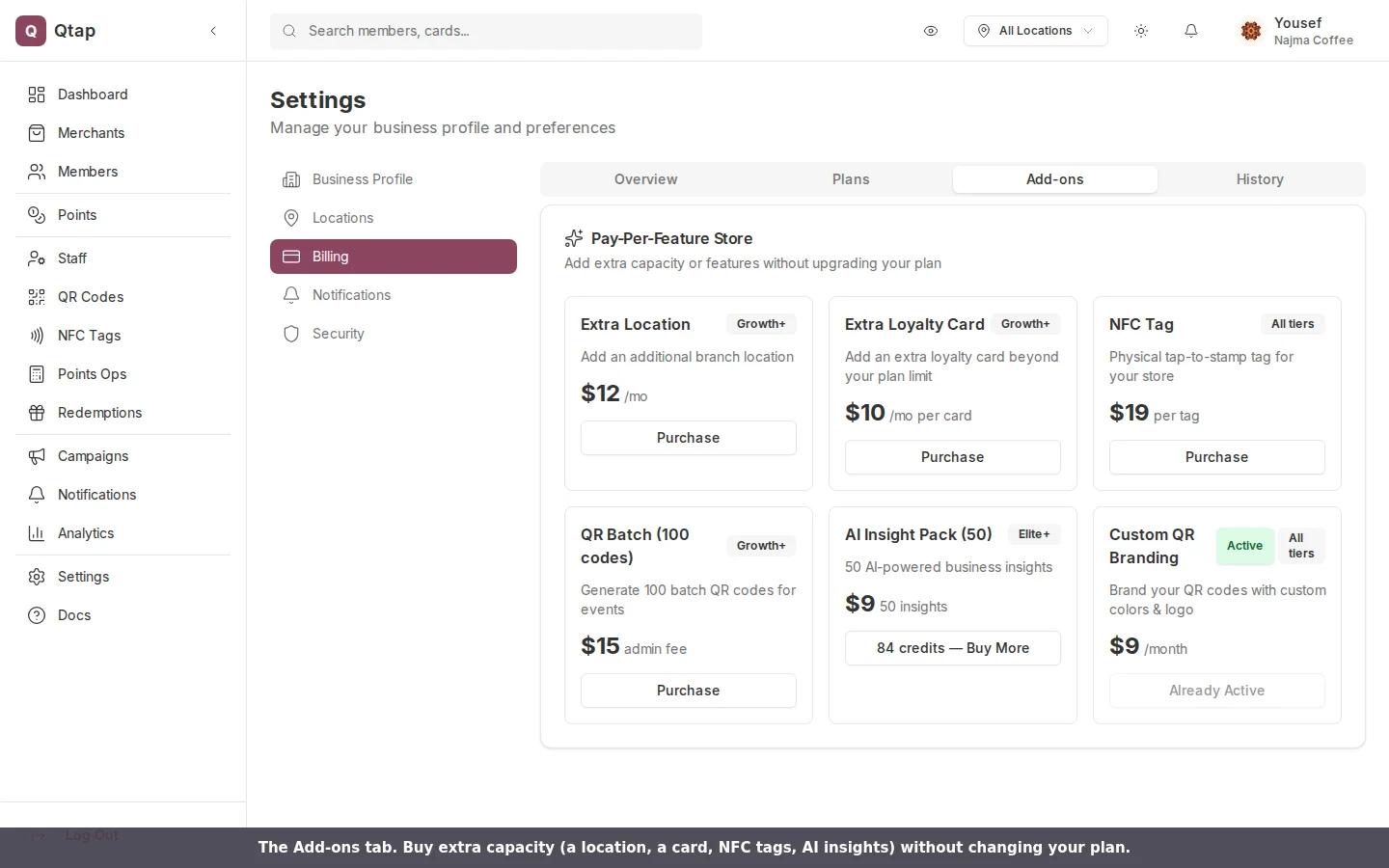
If you need a little more of one thing, you can buy it on its own from the **Add-ons** tab rather than moving up a whole plan.
| Add-on | Price | Available on |
| ----------------------------- | --------------------------------- | ---------------- |
| Extra location | $15 / $12 / \$9 per month by tier | Growth and above |
| Extra loyalty card | \$10 per month per card | Growth and above |
| NFC tag | \$19 per tag | All plans |
| Batch QR (100 codes) | \$15 admin fee | Growth and above |
| AI Insight pack (50 insights) | \$9 | Elite and above |
| Custom QR branding | \$9 per month | All plans |
## Add-ons instead of upgrading
If you need a little more of one thing, you can buy it on its own from the **Add-ons** tab rather than moving up a whole plan.
| Add-on | Price | Available on |
| ----------------------------- | --------------------------------- | ---------------- |
| Extra location | $15 / $12 / \$9 per month by tier | Growth and above |
| Extra loyalty card | \$10 per month per card | Growth and above |
| NFC tag | \$19 per tag | All plans |
| Batch QR (100 codes) | \$15 admin fee | Growth and above |
| AI Insight pack (50 insights) | \$9 | Elite and above |
| Custom QR branding | \$9 per month | All plans |
 ## Changing your plan
The **Plans** tab in Settings > Billing is where you move up or down. Upgrades apply immediately and charge the prorated difference for the rest of the period. Downgrades check your usage first and ask you to reduce locations, staff, or cards if you are over the lower plan's limit.
## Changing your plan
The **Plans** tab in Settings > Billing is where you move up or down. Upgrades apply immediately and charge the prorated difference for the rest of the period. Downgrades check your usage first and ask you to reduce locations, staff, or cards if you are over the lower plan's limit.
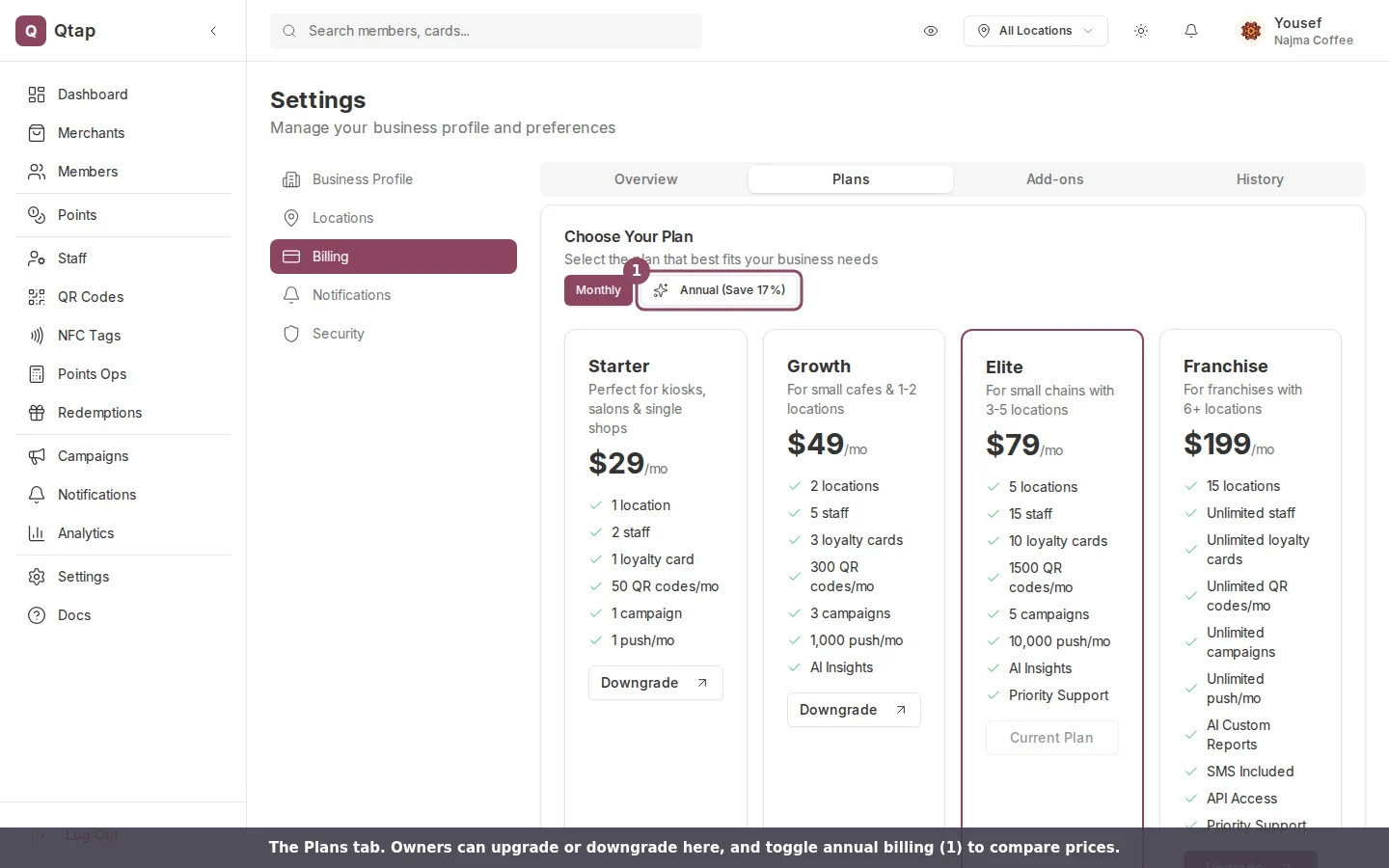 Only the account owner can change the plan or buy add-ons. Managers and staff can view the plans but see a **Contact Owner** button instead of an upgrade button.
For more than 15 locations, custom branding, or a white-labeled app, contact sales about an enterprise arrangement.
Upgrade, downgrade, buy add-ons, and manage invoices
Add and manage the locations your plan covers
Only the account owner can change the plan or buy add-ons. Managers and staff can view the plans but see a **Contact Owner** button instead of an upgrade button.
For more than 15 locations, custom branding, or a white-labeled app, contact sales about an enterprise arrangement.
Upgrade, downgrade, buy add-ons, and manage invoices
Add and manage the locations your plan covers