> ## Documentation Index
> Fetch the complete documentation index at: https://docs.qtap.qa/llms.txt
> Use this file to discover all available pages before exploring further.
# Completing a member's profile
> Add a missing phone number or birthday to a member so you can reach them and include them in birthday campaigns.
A customer can join your loyalty program with almost nothing on file. After a first scan you might have a name and little else. When a phone number or birthday is blank, you can fill it in from the member's profile, as long as you are an owner or a manager.
## Open the member's profile
Go to **Members** in the sidebar and click the customer's row. Their profile opens with contact details on the left and their activity on the right.
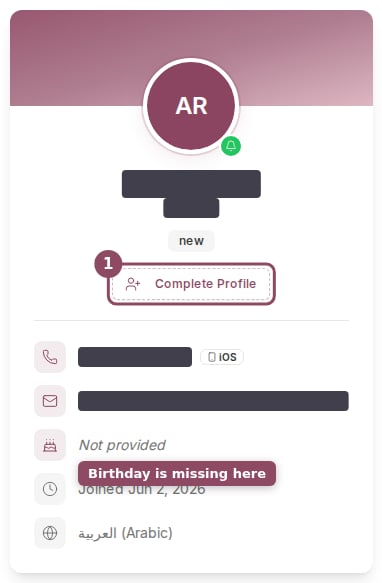
If the member is missing a phone number or a birthday, a **Complete Profile** button appears on their profile card, just under their name. The blank line reads "Not provided", so you can see at a glance what is missing.
 ## Add the missing details
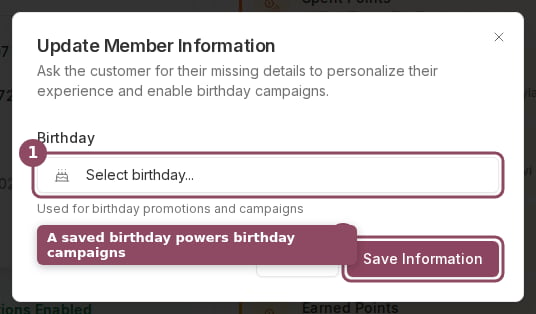
Click **Complete Profile** to open the **Update Member Information** box. It only shows the fields that are still empty, so a member who already has a phone number on file will only see the birthday field.
## Add the missing details
Click **Complete Profile** to open the **Update Member Information** box. It only shows the fields that are still empty, so a member who already has a phone number on file will only see the birthday field.
 * **Phone number.** Type the number with its country code, for example +974 5500 0000. This is the number your team can reach the customer on.
* **Birthday.** Click **Select birthday** and choose the date. Use the month and year dropdowns above the calendar to jump straight to the birth year instead of paging back one month at a time.
* **Phone number.** Type the number with its country code, for example +974 5500 0000. This is the number your team can reach the customer on.
* **Birthday.** Click **Select birthday** and choose the date. Use the month and year dropdowns above the calendar to jump straight to the birth year instead of paging back one month at a time.
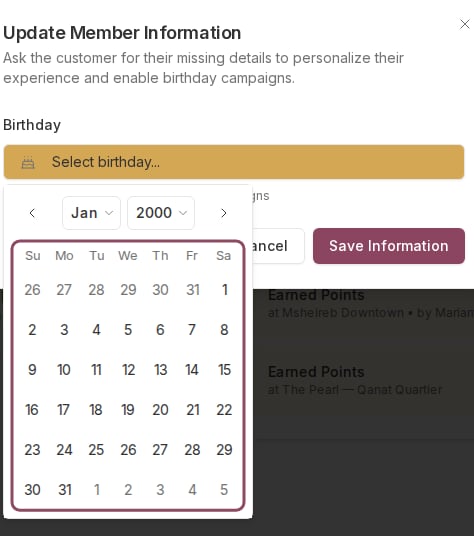 Click **Save Information** when you are done, and the profile updates right away.
## You can only fill in blanks
This box adds details that are missing. It does not change a phone number or birthday that is already saved, and a field that already has a value will not appear here at all. If a saved value is wrong, the customer corrects it themselves in the Qtap app.
## Why the birthday matters
A birthday on file is what makes a member eligible for a [Birthday campaign](/merchants/campaigns/birthday). Without a date, Qtap has no way to know when to send the birthday reward, so that member is skipped. Adding birthdays as customers share them widens the audience for that campaign.
## Who can do this
The **Complete Profile** button shows for the owner and manager roles. The staff role does not see it, even when a staff member has full access to the Members section, because this action is tied to the role rather than to the Members permission.
The full member profile page: contact details, activity, and notes
Send a reward around each member's birthday
Click **Save Information** when you are done, and the profile updates right away.
## You can only fill in blanks
This box adds details that are missing. It does not change a phone number or birthday that is already saved, and a field that already has a value will not appear here at all. If a saved value is wrong, the customer corrects it themselves in the Qtap app.
## Why the birthday matters
A birthday on file is what makes a member eligible for a [Birthday campaign](/merchants/campaigns/birthday). Without a date, Qtap has no way to know when to send the birthday reward, so that member is skipped. Adding birthdays as customers share them widens the audience for that campaign.
## Who can do this
The **Complete Profile** button shows for the owner and manager roles. The staff role does not see it, even when a staff member has full access to the Members section, because this action is tied to the role rather than to the Members permission.
The full member profile page: contact details, activity, and notes
Send a reward around each member's birthday