> ## Documentation Index
> Fetch the complete documentation index at: https://docs.qtap.qa/llms.txt
> Use this file to discover all available pages before exploring further.
# QR code plan limits and monthly quotas
> How many QR codes your plan lets you create each month, when the count resets, and what happens when a batch would take you over.
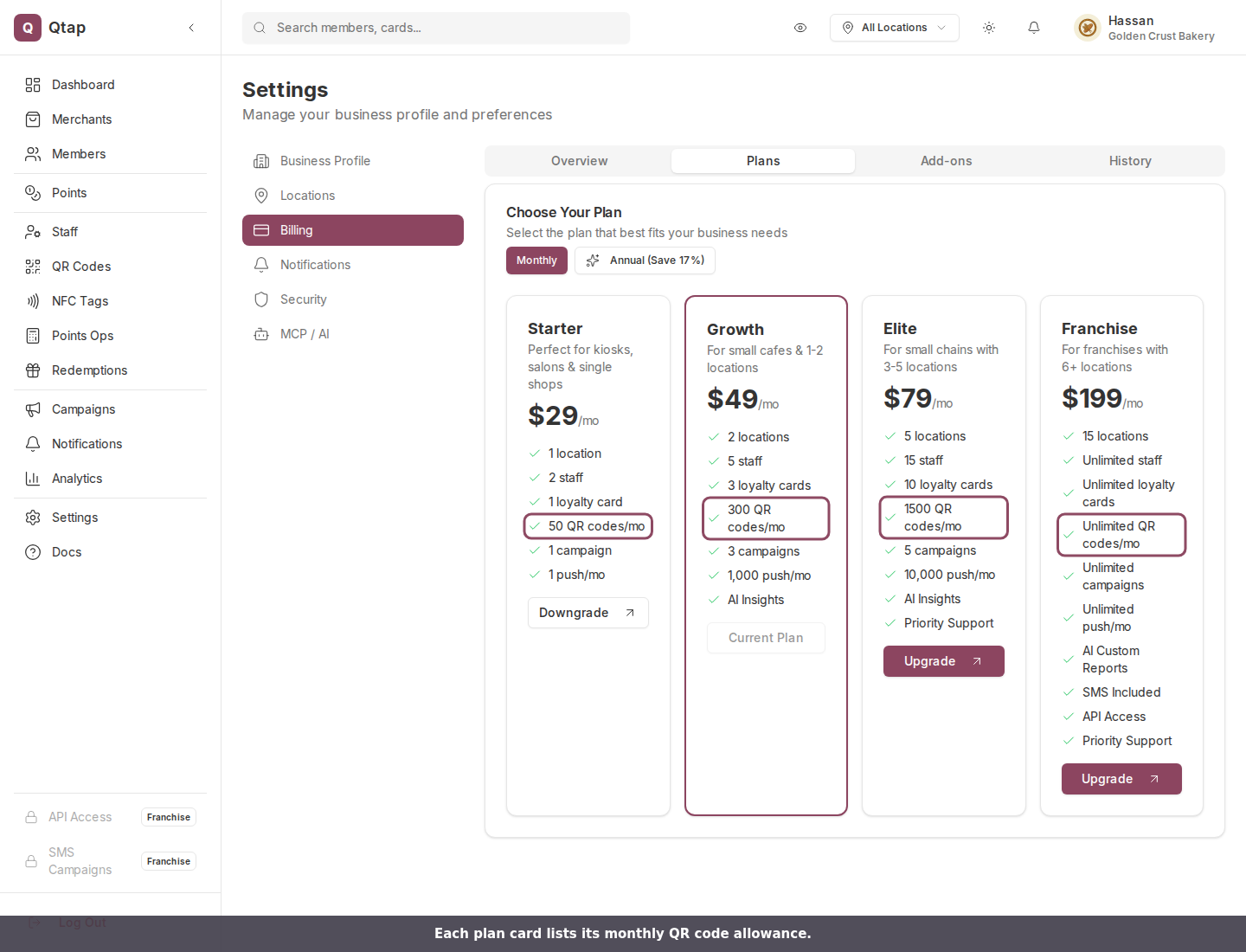
Every Qtap plan comes with a number of QR codes you can create per calendar month. The count is about creating codes, not scanning them, so a single reusable code on your counter can take thousands of scans without touching the quota.
## What your plan allows
| Plan | QR codes per month |
| - | - |
| Starter | 50 |
| Growth | 300 |
| Elite | 1,500 |
| Franchise | Unlimited |
You can see the same numbers on each plan card under **Settings > Billing**, on the **Plans** tab.
 ## Check how much you have used
Open **Settings > Billing** and stay on the **Overview** tab. This page needs the Settings permission, which managers do not have by default, so if you cannot open it, ask the owner or a teammate with Settings access to check for you. The **QR Codes (this month)** meter reads as a plain fraction, so the figure you see is the real one.
## Check how much you have used
Open **Settings > Billing** and stay on the **Overview** tab. This page needs the Settings permission, which managers do not have by default, so if you cannot open it, ask the owner or a teammate with Settings access to check for you. The **QR Codes (this month)** meter reads as a plain fraction, so the figure you see is the real one.
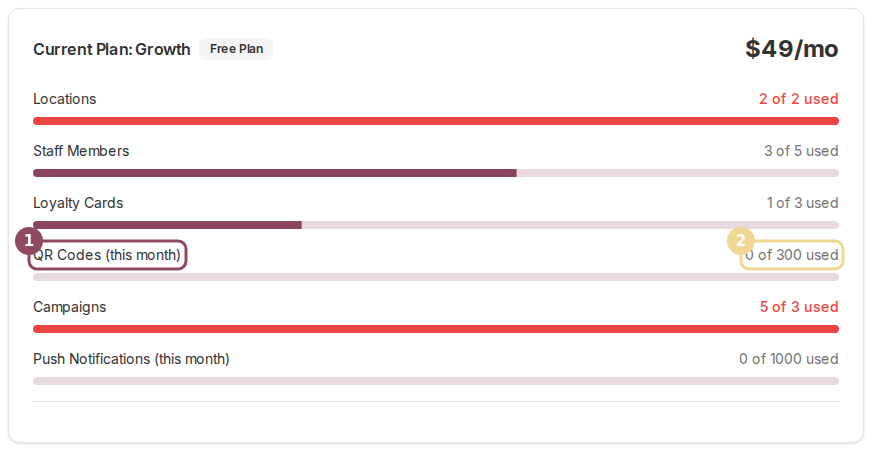 The meter and the quota both count codes created since midnight on the 1st of the current month. Codes you made in earlier months still sit in your QR Codes list and keep working, but they no longer count against you.
The count resets on the 1st. If you are close to your limit near the end of the month and the codes are not urgent, waiting a few days costs nothing.
## A batch spends its whole quantity at once
Batch generation creates many single-use codes in one action, and each one counts. Ask for 40 codes and your month goes up by 40.
The meter and the quota both count codes created since midnight on the 1st of the current month. Codes you made in earlier months still sit in your QR Codes list and keep working, but they no longer count against you.
The count resets on the 1st. If you are close to your limit near the end of the month and the codes are not urgent, waiting a few days costs nothing.
## A batch spends its whole quantity at once
Batch generation creates many single-use codes in one action, and each one counts. Ask for 40 codes and your month goes up by 40.
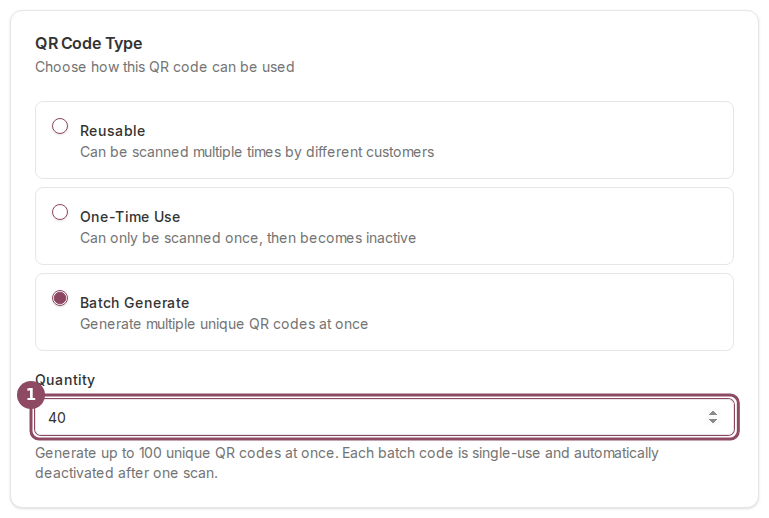 Qtap checks the whole batch before it creates anything. On Growth with 280 codes already made this month, a batch of 40 would land at 320, so nothing is created and you keep all 20 of your remaining codes. Lower the quantity to 20 or less and it goes through.
## When you reach the limit
Saving a code that would cross your allowance fails with a message naming your cap:
> QR code limit reached for your plan (300/month). Upgrade your plan to generate more.
Your options:
* **Wait for the 1st**, when the count starts over at zero.
* **Delete codes you created this month.** Deleting is permanent and takes the scan history with it, so only do this for codes you printed by mistake or never used. A deleted code frees its slot straight away.
* **Move to a bigger plan** under **Settings > Billing**. The new allowance applies as soon as the plan change goes through, and codes you already created this month still count toward it.
Deleting an old code to free a slot will not help. Only codes created since the 1st count, so removing one from last month changes nothing this month and breaks any printed copies of it.
## Reuse before you regenerate
Most quota trouble comes from making a fresh code for something an existing one already covers. A reusable code has no scan ceiling unless you set one, so a single code per table or per poster is usually all you need. Regenerate when a code is really spent: a one-time code after its single scan, or a code whose printed copy has gone missing.
## Who can create codes
Owners and managers can generate QR codes by default. Staff cannot, unless you grant them QR access in their permissions. See [Roles and permissions](/merchants/staff/roles-permissions).
## Related
The full walkthrough for creating a single code.
Which plans include batch generation and how credit packs work.
Per-code limits, which are separate from your monthly quota.
Every meter on the Billing page and what each one counts.
This documentation is built and hosted on [Mintlify](https://mintlify.com), a developer documentation platform.
Qtap checks the whole batch before it creates anything. On Growth with 280 codes already made this month, a batch of 40 would land at 320, so nothing is created and you keep all 20 of your remaining codes. Lower the quantity to 20 or less and it goes through.
## When you reach the limit
Saving a code that would cross your allowance fails with a message naming your cap:
> QR code limit reached for your plan (300/month). Upgrade your plan to generate more.
Your options:
* **Wait for the 1st**, when the count starts over at zero.
* **Delete codes you created this month.** Deleting is permanent and takes the scan history with it, so only do this for codes you printed by mistake or never used. A deleted code frees its slot straight away.
* **Move to a bigger plan** under **Settings > Billing**. The new allowance applies as soon as the plan change goes through, and codes you already created this month still count toward it.
Deleting an old code to free a slot will not help. Only codes created since the 1st count, so removing one from last month changes nothing this month and breaks any printed copies of it.
## Reuse before you regenerate
Most quota trouble comes from making a fresh code for something an existing one already covers. A reusable code has no scan ceiling unless you set one, so a single code per table or per poster is usually all you need. Regenerate when a code is really spent: a one-time code after its single scan, or a code whose printed copy has gone missing.
## Who can create codes
Owners and managers can generate QR codes by default. Staff cannot, unless you grant them QR access in their permissions. See [Roles and permissions](/merchants/staff/roles-permissions).
## Related
The full walkthrough for creating a single code.
Which plans include batch generation and how credit packs work.
Per-code limits, which are separate from your monthly quota.
Every meter on the Billing page and what each one counts.
This documentation is built and hosted on [Mintlify](https://mintlify.com), a developer documentation platform.