> ## Documentation Index
> Fetch the complete documentation index at: https://docs.qtap.qa/llms.txt
> Use this file to discover all available pages before exploring further.
# What kind of reward you are handing over
> Every voucher on the Redemptions page carries a strip that names the kind of reward, where it came from, and what staff should do at the till.
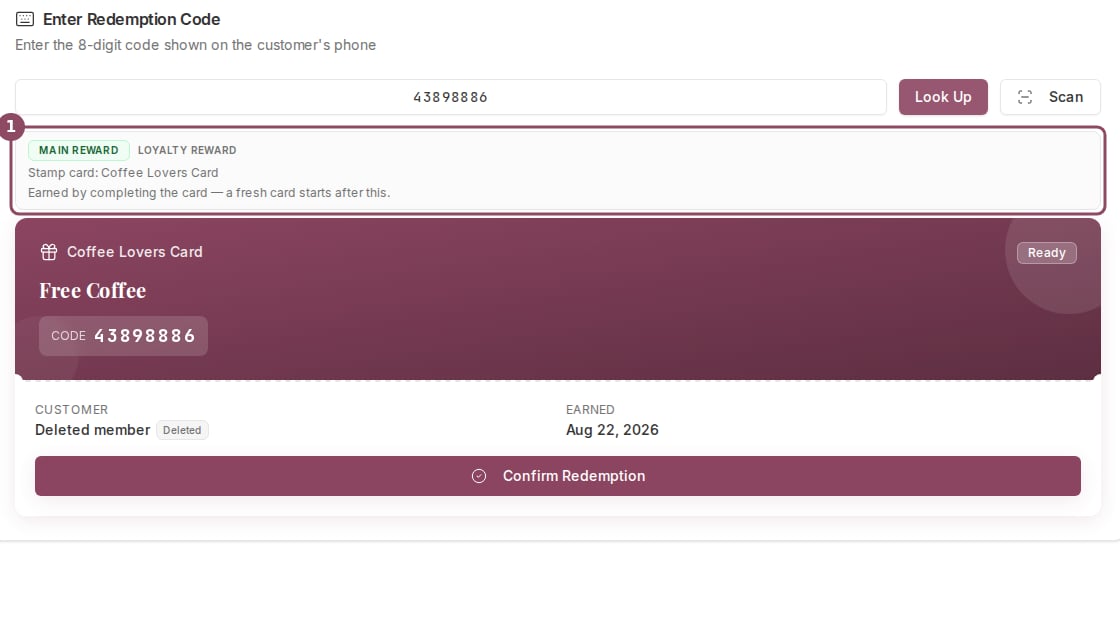
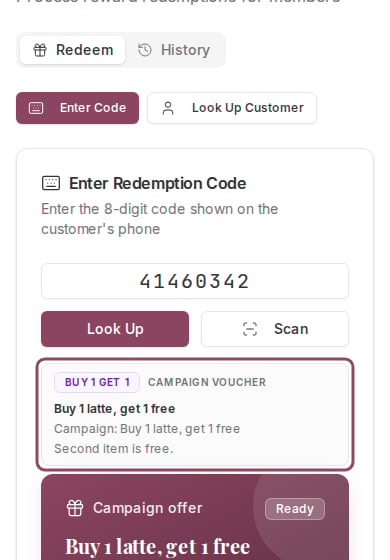
A voucher called "10% Off Any Drink" could be a milestone reward off a stamp card or a discount voucher from a campaign. Those need two different things from whoever is at the till. Qtap answers that before anyone hands anything over: above every voucher on the **Redemptions** page sits a grey strip that names the kind of reward and says what to do with it.
 ## What the strip tells you
Reading left to right and top to bottom, it holds up to five things:
1. **The badge.** The kind of reward, colour-coded.
2. **The source label.** Either "Loyalty reward" (earned on a stamp card or points program) or "Campaign voucher" (claimed from a campaign or public offer).
3. **The terms.** The number staff act on: a percentage, an item, a points cost, a stamp threshold.
4. **The origin.** Which card, program or campaign it came from.
5. **A counter note.** One line saying what happens when you confirm.
Every one of those comes from a stored field on the reward. None of it is guessed from the reward's name, which is why a stamp-card reward named "10% Off Any Drink" is badged **Milestone reward** rather than Discount.
## Rewards earned on a card or program
These carry the source label "Loyalty reward" and one of three badges.
**Main reward** is the one at the end of the card. On a stamp card the note says it was earned by completing the card, and that a fresh card starts after this. It shows no threshold, because a main reward fires when the card completes rather than at a set number.
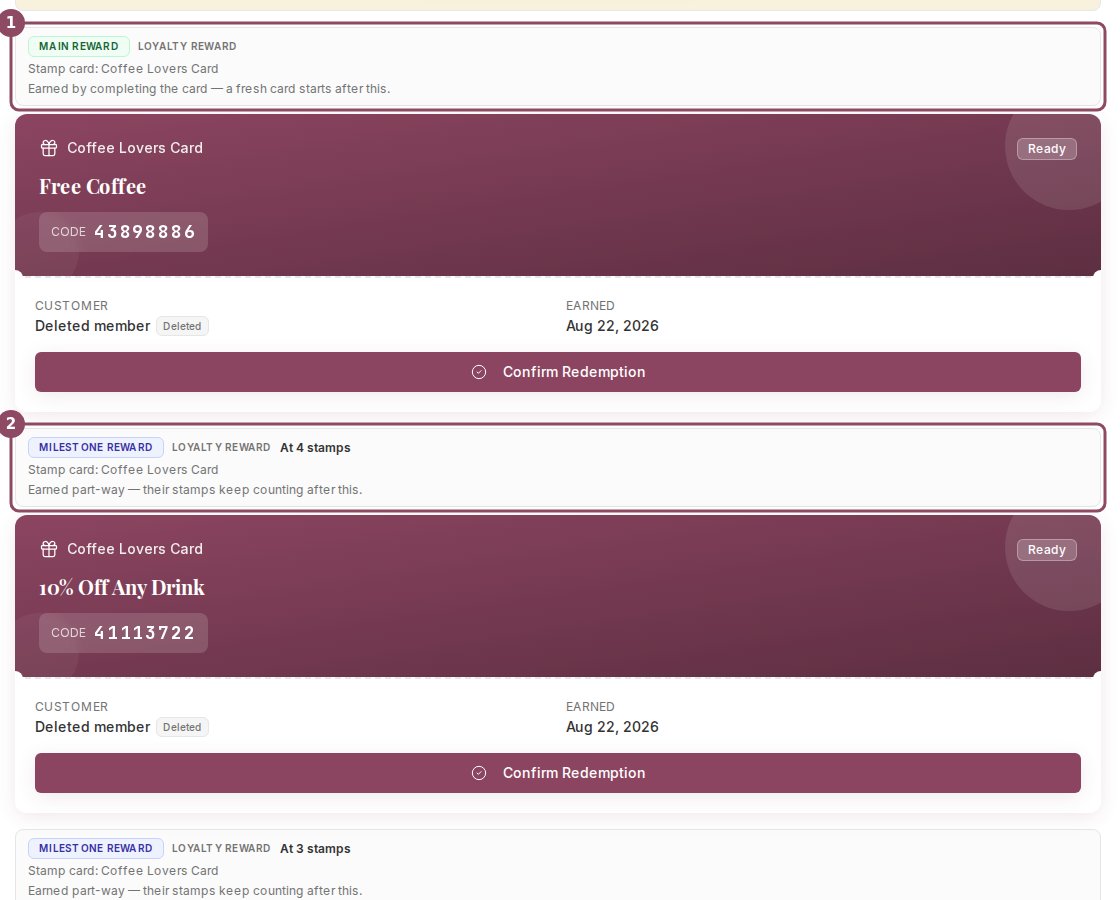
**Milestone reward** is earned part-way. On a stamp card the terms line shows the threshold ("At 4 stamps") and the note says their stamps keep counting after this. That part matters at the till: handing over a milestone reward does not reset anything.
**Signup bonus** is the reward given when the customer joined, noted as "Given when they joined."
A member can hold several at once, and each voucher gets its own strip.
## What the strip tells you
Reading left to right and top to bottom, it holds up to five things:
1. **The badge.** The kind of reward, colour-coded.
2. **The source label.** Either "Loyalty reward" (earned on a stamp card or points program) or "Campaign voucher" (claimed from a campaign or public offer).
3. **The terms.** The number staff act on: a percentage, an item, a points cost, a stamp threshold.
4. **The origin.** Which card, program or campaign it came from.
5. **A counter note.** One line saying what happens when you confirm.
Every one of those comes from a stored field on the reward. None of it is guessed from the reward's name, which is why a stamp-card reward named "10% Off Any Drink" is badged **Milestone reward** rather than Discount.
## Rewards earned on a card or program
These carry the source label "Loyalty reward" and one of three badges.
**Main reward** is the one at the end of the card. On a stamp card the note says it was earned by completing the card, and that a fresh card starts after this. It shows no threshold, because a main reward fires when the card completes rather than at a set number.
**Milestone reward** is earned part-way. On a stamp card the terms line shows the threshold ("At 4 stamps") and the note says their stamps keep counting after this. That part matters at the till: handing over a milestone reward does not reset anything.
**Signup bonus** is the reward given when the customer joined, noted as "Given when they joined."
A member can hold several at once, and each voucher gets its own strip.
 ## Campaign and offer vouchers
A voucher the customer claimed from a campaign or a public offer carries the source label "Campaign voucher" and an origin line naming the campaign. The badge and the note depend on how the offer was set up:
| Badge | What the counter note says |
| - | - |
| Discount | Take this off the bill. |
| Free item | Hand the item over, no charge. |
| Buy 1 get 1 | Second item is free. |
| Bonus stamps | Confirming adds stamps to their card: nothing to hand over. |
| Bonus points | Confirming adds points to their balance: nothing to hand over. |
| Points multiplier | Extra points on this visit: nothing to hand over. |
| Badge | Recognition only: nothing to hand over. |
| Merchant offer | Follow the wording written on the voucher. |
The terms line carries the offer's own wording, so a percentage offer shows the figure and a buy-one-get-one shows the items.
## Campaign and offer vouchers
A voucher the customer claimed from a campaign or a public offer carries the source label "Campaign voucher" and an origin line naming the campaign. The badge and the note depend on how the offer was set up:
| Badge | What the counter note says |
| - | - |
| Discount | Take this off the bill. |
| Free item | Hand the item over, no charge. |
| Buy 1 get 1 | Second item is free. |
| Bonus stamps | Confirming adds stamps to their card: nothing to hand over. |
| Bonus points | Confirming adds points to their balance: nothing to hand over. |
| Points multiplier | Extra points on this visit: nothing to hand over. |
| Badge | Recognition only: nothing to hand over. |
| Merchant offer | Follow the wording written on the voucher. |
The terms line carries the offer's own wording, so a percentage offer shows the figure and a buy-one-get-one shows the items.

 ## Rewards the customer already paid for
Customers can spend points or stamps inside the app to buy a voucher before they reach the counter. Those keep their loyalty badge and gain one extra line saying the reward was already paid for in the app and nothing is deducted now. Confirming hands the item over without touching the balance a second time.
## Rewards the customer already paid for
Customers can spend points or stamps inside the app to buy a voucher before they reach the counter. Those keep their loyalty badge and gain one extra line saying the reward was already paid for in the app and nothing is deducted now. Confirming hands the item over without touching the balance a second time.
 These come through the code box rather than a customer lookup, so the origin line stays blank.
## Where it shows up
The strip follows a reward through the whole redemption:
* On the **Enter Code** tab, above the voucher the code resolved to.
* On the **Look Up Customer** tab, above each voucher the member is holding.
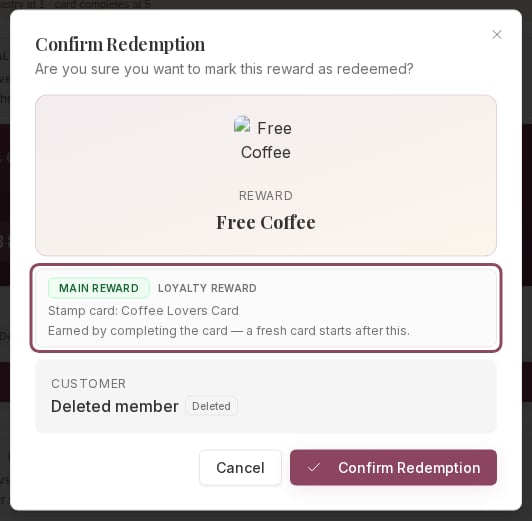
* In the **Confirm Redemption** dialog, so the last screen before you commit still names the type.
These come through the code box rather than a customer lookup, so the origin line stays blank.
## Where it shows up
The strip follows a reward through the whole redemption:
* On the **Enter Code** tab, above the voucher the code resolved to.
* On the **Look Up Customer** tab, above each voucher the member is holding.
* In the **Confirm Redemption** dialog, so the last screen before you commit still names the type.
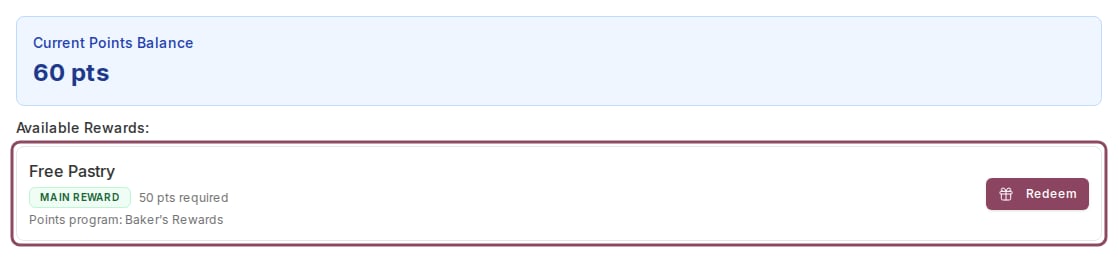
 Rewards a member can buy with their points balance right now appear in a separate list further down the page. Those rows are tighter, so they show the badge and the origin without the counter note.
 ## On a phone at the counter
The strip is built to wrap rather than cut off, so a tablet or phone at the till shows the same words as a desktop.
## On a phone at the counter
The strip is built to wrap rather than cut off, so a tablet or phone at the till shows the same words as a desktop.
 A voucher with **no strip at all** means Qtap could not read what kind of reward it is, usually an older campaign saved before the offer types were added. It does not mean the reward is an ordinary one. Qtap shows nothing rather than guess, so go by the wording on the voucher and check with the owner if you are unsure.
The strip is a label for whoever is serving. Confirming does the same thing whether the strip is there or not: a bonus-stamps voucher credits the stamps, and a discount voucher is marked used. Qtap never adjusts a bill, so a discount comes off by hand on your till.
Anyone who can open the Redemptions page sees the strip. Redeeming is switched on by default for both managers and staff, so this reaches everyone working the counter. See [Roles and permissions](/merchants/staff/roles-permissions) to change who can redeem, and [Scan to redeem](/merchants/redemptions/scan-redemption) for the fastest way to pull a customer's rewards up.
This documentation is built and hosted on [Mintlify](https://mintlify.com), a developer documentation platform.
A voucher with **no strip at all** means Qtap could not read what kind of reward it is, usually an older campaign saved before the offer types were added. It does not mean the reward is an ordinary one. Qtap shows nothing rather than guess, so go by the wording on the voucher and check with the owner if you are unsure.
The strip is a label for whoever is serving. Confirming does the same thing whether the strip is there or not: a bonus-stamps voucher credits the stamps, and a discount voucher is marked used. Qtap never adjusts a bill, so a discount comes off by hand on your till.
Anyone who can open the Redemptions page sees the strip. Redeeming is switched on by default for both managers and staff, so this reaches everyone working the counter. See [Roles and permissions](/merchants/staff/roles-permissions) to change who can redeem, and [Scan to redeem](/merchants/redemptions/scan-redemption) for the fastest way to pull a customer's rewards up.
This documentation is built and hosted on [Mintlify](https://mintlify.com), a developer documentation platform.