> ## Documentation Index
> Fetch the complete documentation index at: https://docs.qtap.qa/llms.txt
> Use this file to discover all available pages before exploring further.
# The staff activity log
> See every stamp, point, redemption, and member join your team records, then export it as a CSV.
The activity log is a running record of what your team does in the dashboard. Each time someone issues a stamp, awards points, redeems a reward, or signs up a member, the action lands here with a timestamp, the staff member who did it, and the branch it happened at. It is the page to open when you want to check who did what, or settle a question about a redemption.
## Open the log
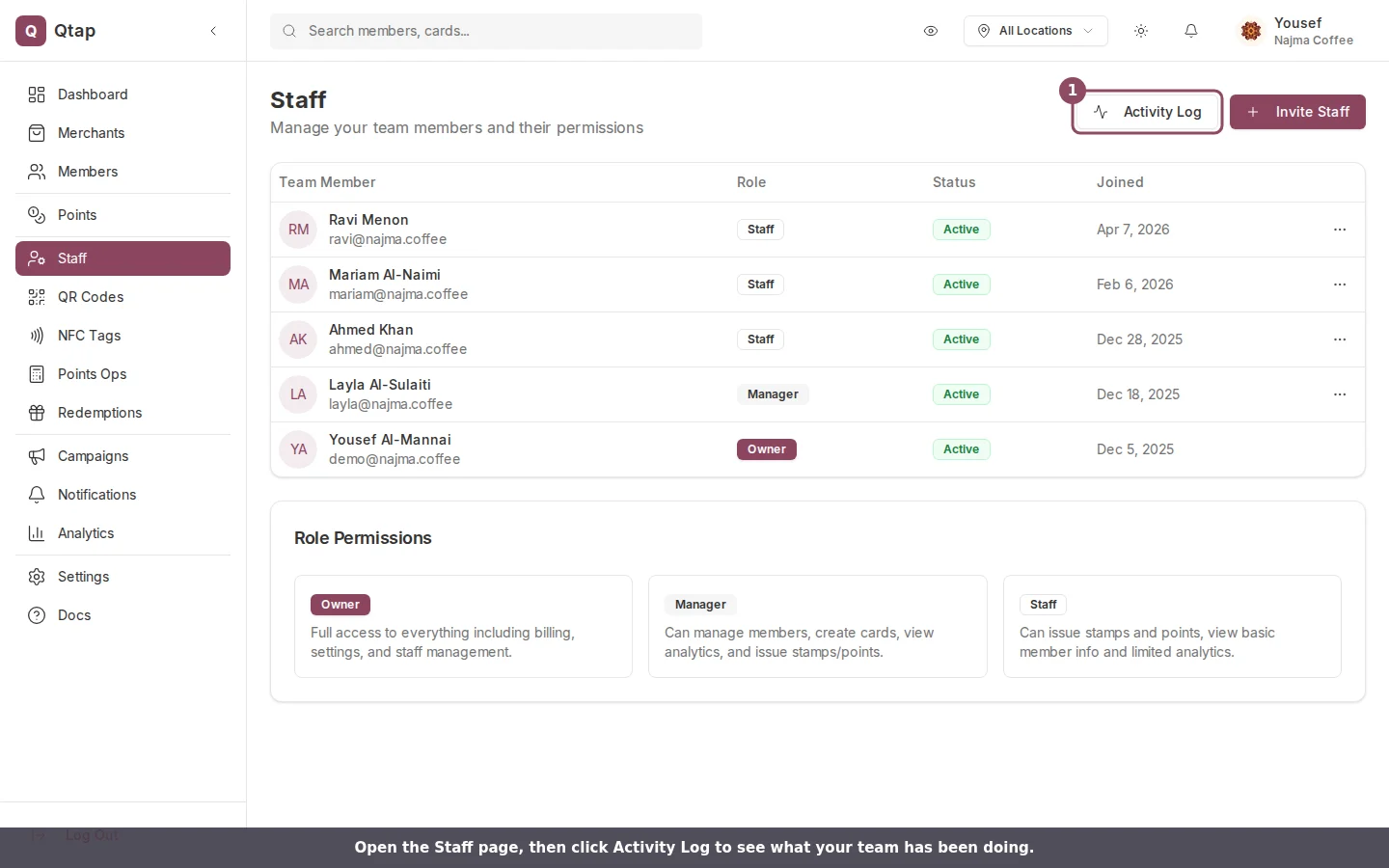
Go to **Staff** in the left sidebar, then click **Activity Log** in the top right.
 The log opens with the most recent action at the top.
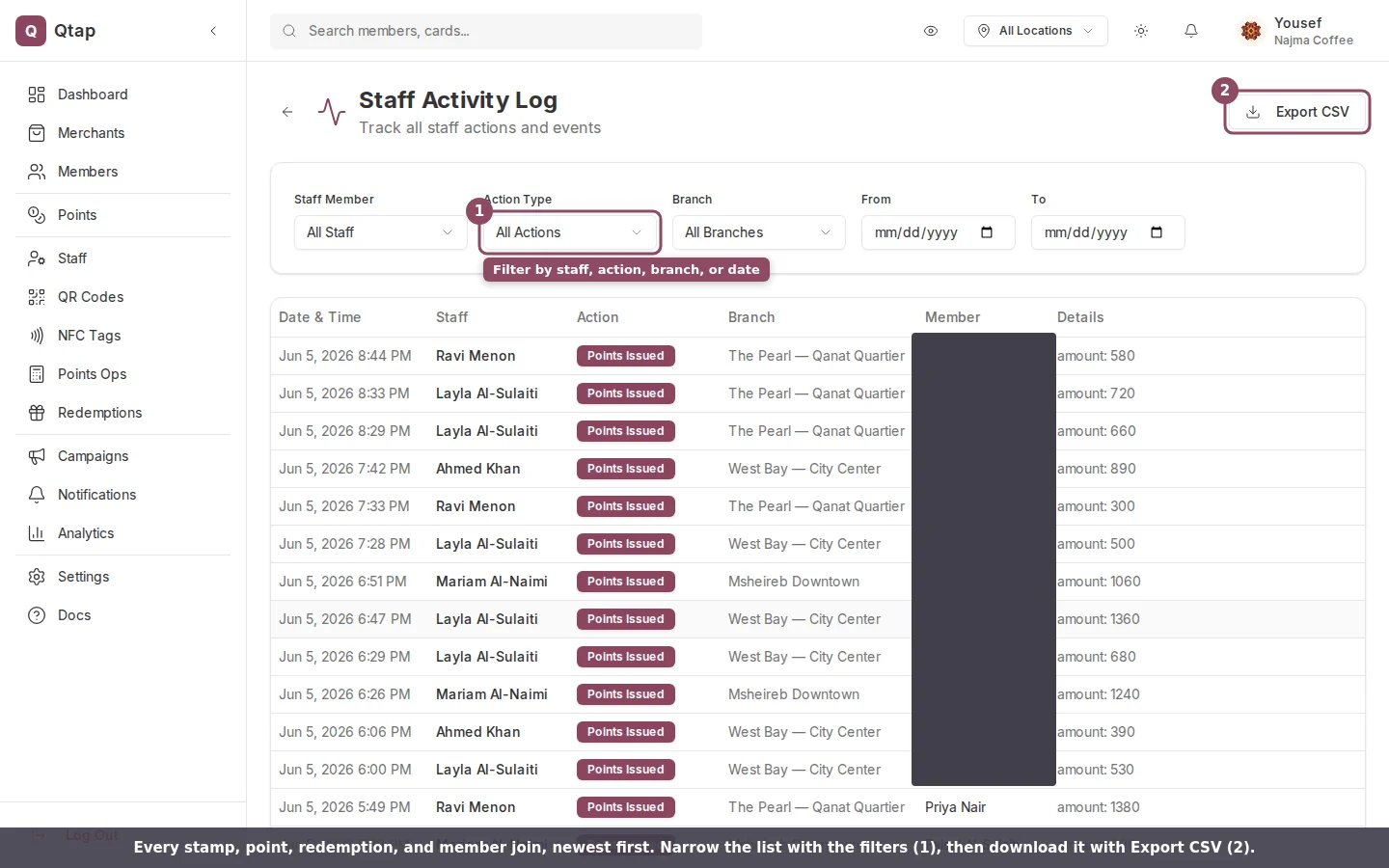 Every row has six columns:
* **Date & Time** when the action happened.
* **Staff** the team member who did it. Automated actions, like a campaign going out on schedule, show as **System**.
* **Action** what happened, shown as a labelled badge.
* **Branch** the location it was recorded at.
* **Member** the customer tied to the action. Shows a dash when no member applies.
* **Details** extra context, like the number of points awarded.
## What gets recorded
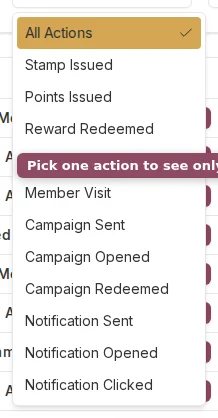
The log captures the actions that touch a member: **Stamp Issued**, **Points Issued**, **Reward Redeemed**, **Member Joined**, and **Member Visit**. It also records campaign and notification events: **Campaign Sent**, **Campaign Opened**, **Campaign Redeemed**, **Notification Sent**, **Notification Opened**, and **Notification Clicked**.
Team changes are not in this log. Inviting a teammate, removing one, or editing someone's permissions does not show up here. This page covers loyalty actions only.
## Filter the list
Use the filters above the table to narrow what you see. You can filter by staff member, by action type, by date range with the **From** and **To** fields, and, if your business has more than one location, by branch. A **Clear** button appears once a filter is set.
Every row has six columns:
* **Date & Time** when the action happened.
* **Staff** the team member who did it. Automated actions, like a campaign going out on schedule, show as **System**.
* **Action** what happened, shown as a labelled badge.
* **Branch** the location it was recorded at.
* **Member** the customer tied to the action. Shows a dash when no member applies.
* **Details** extra context, like the number of points awarded.
## What gets recorded
The log captures the actions that touch a member: **Stamp Issued**, **Points Issued**, **Reward Redeemed**, **Member Joined**, and **Member Visit**. It also records campaign and notification events: **Campaign Sent**, **Campaign Opened**, **Campaign Redeemed**, **Notification Sent**, **Notification Opened**, and **Notification Clicked**.
Team changes are not in this log. Inviting a teammate, removing one, or editing someone's permissions does not show up here. This page covers loyalty actions only.
## Filter the list
Use the filters above the table to narrow what you see. You can filter by staff member, by action type, by date range with the **From** and **To** fields, and, if your business has more than one location, by branch. A **Clear** button appears once a filter is set.
 The log shows up to the 200 most recent matching actions. If you are looking for something older, set a date range or pick a specific staff member or action to bring it into view.
## Export to CSV
Click **Export CSV** to download what is currently in the table, filters and all. The file lands in your downloads with your business name and the date in a report header, ready to open in Excel or Google Sheets. The button stays greyed out while the list is empty.
## Who can see it
Owners and managers can open the activity log. A teammate on the Staff role can't reach it unless you give them staff-management access from their permissions. For more on roles, see [Roles and permissions](/merchants/staff/roles-permissions).
The log shows up to the 200 most recent matching actions. If you are looking for something older, set a date range or pick a specific staff member or action to bring it into view.
## Export to CSV
Click **Export CSV** to download what is currently in the table, filters and all. The file lands in your downloads with your business name and the date in a report header, ready to open in Excel or Google Sheets. The button stays greyed out while the list is empty.
## Who can see it
Owners and managers can open the activity log. A teammate on the Staff role can't reach it unless you give them staff-management access from their permissions. For more on roles, see [Roles and permissions](/merchants/staff/roles-permissions).