Get back into your Qtap account when you can’t remember your password.
If you can’t remember your password and can’t sign in, you don’t need to contact support. Qtap emails you a reset link, and you set a new password from that link. The whole thing takes about a minute.This is different from the Change password form on the Security page. That form is for changing a password you already know while you’re signed in. Use this page when you’re locked out.
The password reset journey: from the login page to a new password and back into the dashboard.
On the login page, click Forgot password? under the password field. You land on the Forgot Password page.
2
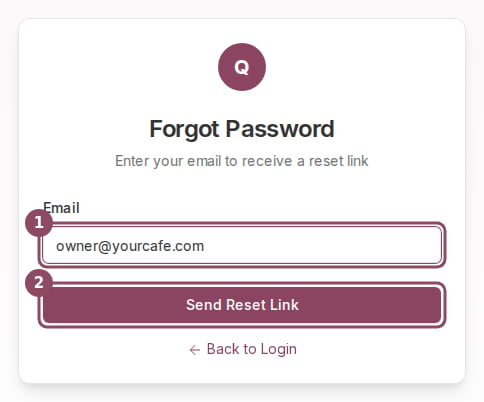
Enter your email
Type the email address you use to sign in to Qtap, then click Send Reset Link.
Enter your sign-in email and click Send Reset Link.
3
Check your email
A Check Your Email screen appears, and Qtap sends an email titled “Reset your Qtap password” with the reset link inside. Open the email and click the link to continue.
The Check Your Email screen shows up whether or not the address has a Qtap account. Qtap does this on purpose so nobody can use the form to guess which emails are registered. If no email arrives after a few minutes, check your spam folder, then confirm you typed the same address you signed up with.
The reset link signs you in for one purpose: choosing a new password. It opens the Reset Password page.
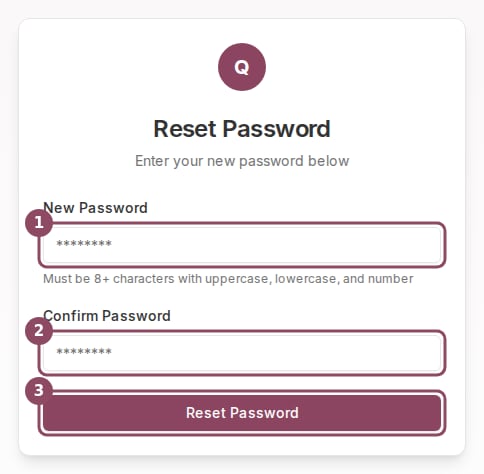
Enter a new password, confirm it, then click Reset Password.
1
Type a new password
Enter your new password in New Password. It needs at least 8 characters and has to include an uppercase letter, a lowercase letter, and a number. This is stricter than the in-app change-password rule, so pick something that meets all four conditions.
2
Confirm it
Type the same password again in Confirm Password. If the two don’t match, you’ll see “Passwords do not match” and nothing is saved until they do.
3
Save
Click Reset Password. A Password Updated screen confirms the change, and Continue to Dashboard takes you straight in with your new password.
Reset links expire. If you open an old link or the link has already been used, the page can’t save a new password. Go back to the login page and request a fresh link with Forgot password?
Check your spam or junk folder first. If it’s still missing, the most likely cause is a typo or a different address than the one on your account. Request the link again and double-check the email you enter. The address has to match the one you sign in with.
The reset link says it's expired or invalid.
Each link works once and only for a limited time. Request a new one from the Forgot password? link on the login page, then use the newest email.
I remember my password and want to change it.
Sign in, then use the Change password form on the Security page. That form asks for your current password first, so you don’t need a reset link.
Do staff reset their own passwords this way?
Yes. Anyone with a Qtap login, owners and staff alike, uses the same Forgot password flow. It works on the login page before anyone signs in.
Security
Change your password while signed in, set up two-factor authentication, and sign out of all sessions.
Staff roles and permissions
Control which team members can reach Settings and other dashboard areas.