


A declined payment starts two different clocks. Fixing the card at any point stops the rest.
The day the charge fails
Your plan shows a red Past Due badge, and a red banner appears at the top of the Billing page: “Your payment is past due. Please update your payment method to avoid service interruption.” Only the account owner sees the Update Payment button next to it, which opens the Stripe billing portal. Qtap also emails the owner. The subject is Your card was declined, and it carries a link straight to the portal along with the amount that failed.The two weeks
Stripe retries the card on its own, and the declined-payment email tells you when. Through this window your branches, staff accounts and loyalty cards all stay active and untouched. Update the card and your plan returns to normal with nothing lost. The clock runs on the day your status changed, so editing your business details or adding members does not reset it or extend it.What gets switched off on day fourteen
If the card is still failing after fourteen days, Qtap moves your account to Starter properly and switches off whatever sits above Starter’s limits. Three of the meters on your Billing page are the ones that matter.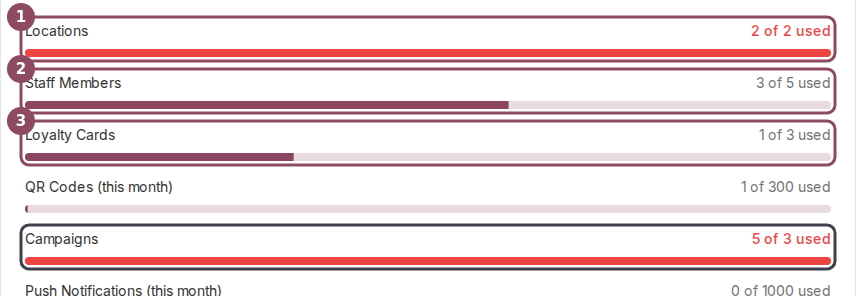
Locations, Staff Members and Loyalty Cards are measured against Starter's limits. Campaigns, boxed in grey, are left alone.
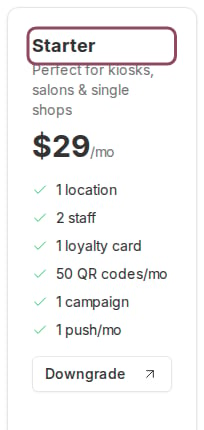
The Starter plan card lists the limits everything is cut back to.
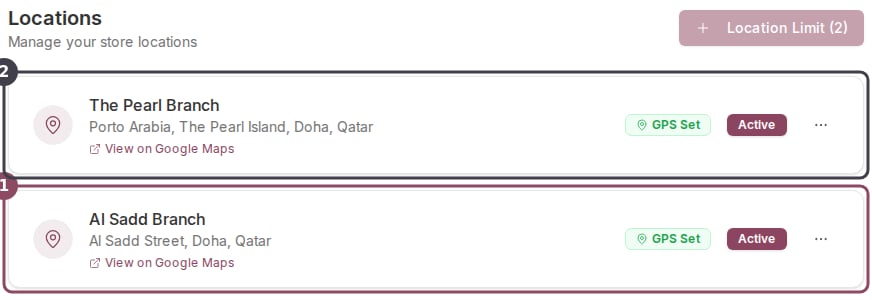
Two active branches on a Growth account. Al Sadd (1) was added first, so it is the one Qtap would switch off; The Pearl (2) would survive.
What your customers never lose
Members, their stamps, their points and every transaction stay exactly where they are through all of this. A branch that gets switched off stops appearing in the dashboard, and the loyalty history recorded against it stays in your reports.Turning things back on
Paying restores your plan and its limits, but it does not switch your branches, staff and cards back on. Reactivate each one yourself from its own page once your billing is healthy again.
If a trial payment fails
When the card fails on the day your trial converts, Qtap moves you to the free Starter plan and keeps the account open so you can try again. Nothing is deactivated at that moment. Your members and their stamps are untouched, and subscribing switches your extra branches, staff seats and campaigns back on.Who can fix it
Only the account owner can open the billing portal and update the card. Managers with billing access can see the Past Due banner but cannot act on it, so pass it to the owner.Invoices and payment method
Update the card you pay with and download past receipts
Understanding your usage meters
Read the meters that decide what gets switched off
Your free trial
How the 14-day trial ends and what happens after
Downgrading your plan
Move down a plan on purpose, with a check first